
What Is Risk Management?
Autobooks Risk Management is a new capability built into the Payments Admin. It gives your financial institution real-time fraud detection, powered by behavioral analytics, across every payment type within Autobooks Payables. Suspicious activity is flagged automatically, so your team can focus attention only where it's needed instead of manually reviewing every transaction.
It's designed to catch the patterns behind account takeovers, social engineering, rapid fund drain, and business email compromise before funds ever leave your settlement account.
How It Works
Every payment is continuously evaluated against seven behavioral risk flags. When a flag is triggered, the payment is either surfaced for review or automatically held, depending on the configuration your financial institution chooses.
Two Configuration Modes
- Monitor Mode (default): Flagged payments appear in the Risk Management dashboard for review, but continue processing normally with no action required. This is the default setting for all financial institutions.
- Hold Mode: Flagged payments are automatically placed on hold, with an alert email sent to your team. Your team then releases or rejects the payment.
To switch from Monitor to Hold mode, contact the Autobooks FI Success team at FISuccess@autobooks.co or call us 866-798-6639. This isn't a self-service toggle.
Note: Even in Monitor mode, your team can still reject or release a flagged payment from the Payment Details modal, as long as the payment hasn't processed yet.
Where Your Team Will Find Risk Management
- Payments Admin home page: A new Risk Management menu item appears in the Payments Admin main menu, with a matching header tab, accessible to all FI Admin users.
- Risk Management Dashboard: Shows flagged activity for the current business day. Stats shown: Flagged, Holds, Users, and Origin, by payment product type. Filter by date range, user, funding account, pay-to name or account, payment origin or method, or status, and export results to CSV if desired.
- Payment Detail: Opening a flagged payment shows the full record, the system-generated flag note (why it was flagged and what triggered it), and an audit trail. Available actions: Reject, Release, Admin Assist, and Request Research.
How to Reject or Release a payment in the Risk Management dashboard
The Risk Management dashboard shows flagged payment activity for the current business day, providing a list of payments for your team to investigate.
The list is searchable and can be filtered by date range, user, payment type or payment status. All search results may be exported as a .CSV file.
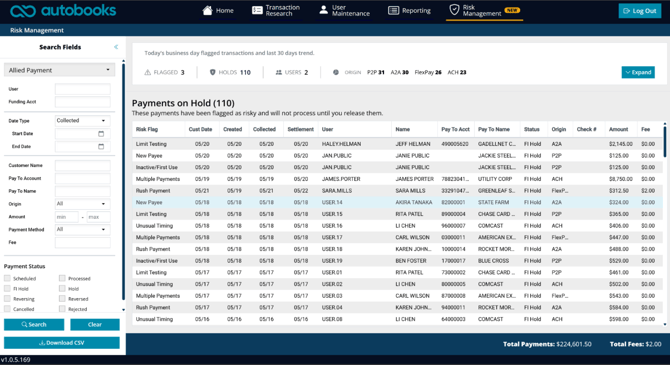
The metrics shown above the payment list are as follows:
- Flagged - total number of payments flagged for the current day
- Holds - total number of payments held (if you have opted for Hold mode)
- Users - total number of users that are associated with that day's flagged payments
- Origin - indicates the bill pay products that the flagged payments were initiated through
To reject or release a flagged payment:
- Click on the payment from the list to open the Payment Details.
- Click the Reject or Release button.
- Click Close to return to the payments list.
Note: Even if you have opted for Monitor mode, you can Reject or Release a payment from the list by following the steps above. This action can be taken up until the payment is sent for processing.