
Every business that is not a sole proprietorship must return a beneficial ownership form before you can book the loan. The form lists each person who owns 25% or more of the business and one person with significant control.
The borrower is notified the form is required, and receives an email with a link to complete it after they submit the loan application. The completed form comes back to your portal.
To review a beneficial ownership form
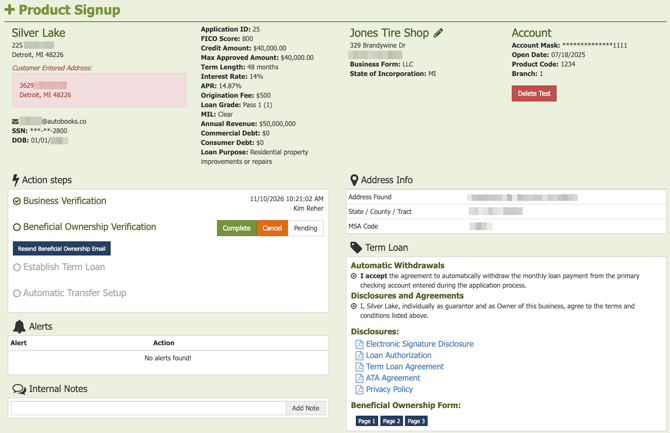
- Open the loan record in the Action Center.
- Find the Beneficial Ownership Verification step in the Action Steps box. If it is grayed out, the form has not come back yet from the borrower. Click Resend Beneficial Ownership Email to email your borrower the link again.
- When the form is returned by the borrower, it will appear just below all other signed Disclosures.
- View each page of the form by clicking the corresponding page button. Check that every owner with 25% or more is listed with name, title and ownership percentage, and that one person with significant control is named.
- If the form is complete, click Complete in the Action Steps.
The next booking step unlocks.
Note: You cannot complete this step without the completed form. If your borrower does not respond, the loan cannot be booked.
Borrowers often submit the form with the additional owners section blank. If it is incomplete, send another reminder and ask your borrower to finish it.
To view the business borrower experience, see Beneficial Ownership for business borrowers.