
Portal Pay supports several ways for customers to make payments. Each method may have different fees, which are set during implementation. Flexibility of payment methods give customers the choice of how they want to pay, while allowing your institution to manage disclosures and fee structures clearly.
Customers must complete all required fields on the Portal Pay payment form. The available payment methods depend on how your institution configured Portal Pay during implementation.
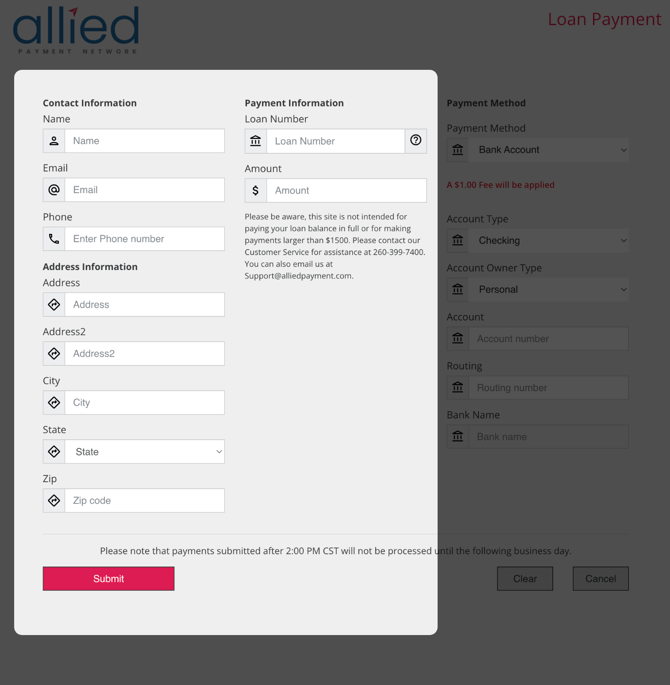
Bank Account Transfer Payments
If your institution allows bank account payments, customers select Bank Account from the payment type drop-down and provide the following:
- Account Type (Checking or Savings)
- Account Owner Type (Personal or Business)
- Account Number
- Routing Number
Debit or Credit Card Payments
If your institution allows card payments, customers select Debit Card or Credit Card from the drop-down (availability depends on your implementation settings) and click Pay With Card. A secure card entry form will appear. Customers enter the following:
- Card Number
- Expiration Date (MM/YY)
- Security Code
Note: The payment methods available to customers are determined by your institution's Portal Pay configuration. Not all options may be enabled.
Key Details
- One-time payments only: Portal Pay does not support recurring or future-dated payments.
- Same-day processing: Payments are effective the day they are submitted, based on your institution's defined cut-off time.
- Confirmation: Customers receive a confirmation number and an email receipt after payment is submitted.