
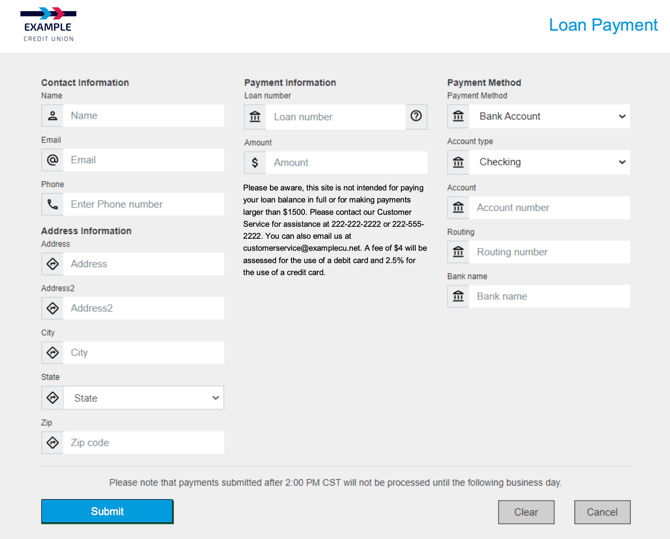
Portal Pay allows customers to make secure, one-time loan payments online using a bank account, debit card, or Mastercard credit card from another financial institution. It provides a fast, convenient way for customers to make payments without needing to log in to digital banking.
When implemented, most financial institutions include a button on their website labeled 'Click here to make a loan payment'. Selecting this button opens the external Portal Pay page, branded to match your institution.
Key Details- One-time payments only: Portal Pay does not support recurring or future-dated payments.
- Same-day processing: Payments are effective the day they are submitted, based on your institution's cut-off time.
- Customizable implementation: Every Portal Pay setup is tailored to match your institution's branding, messaging, and payment preferences.
In addition to the external customer-facing page, an internal Portal Pay page is available for your team. This page can be used by collections, call center staff, or tellers to take loan payments on behalf of customers over the phone or in-branch.
The internal page includes the same data fields as the customer version, with added fields for employee information (such as employee name, department, or branch). You can also choose whether to allow employees to waive fees and define different fee structures for internal payments if desired.
Just like the external version, the internal Portal Pay page provides a confirmation number and sends an email receipt to the customer once a payment is submitted.
Branded Experience
The Portal Pay page is customizable to reflect your financial institution's look and feel. During implementation, our team will replace the default logo with your institution's logo and apply your preferred brand colors to buttons and page elements.
Customization options are available beyond colors and logos. Institutions can also define messaging, disclosures, and available payment methods to ensure the experience aligns with your policies and customer communication standards.
Implementation Options
During setup, your financial institution can choose from several configuration options:
- Button and color settings: Match your institution's branding and colors for a consistent experience.
- Disclosure boxes: Add or edit text in two areas of the page.
- Loan disclosure box: Add messaging to clarify that this site is intended for loan payments only, not for paying off the full balance or submitting large, partial payments.
- Text box by loan number: Provide short guidance on where customers can find their loan number or what format to use.
- Cut-off time: Define the daily cut-off time for payments to be processed the same day.
- Payment methods and fees: Decide which payment methods to offer (bank account, debit card, or Mastercard credit card) and define the associated service fees for each.