
Settings controls how your loan sites look and behave, which documents borrowers sign, which emails they receive and how credit decisions are made. Most settings are configured with your Autobooks team during implementation and change rarely after go live.
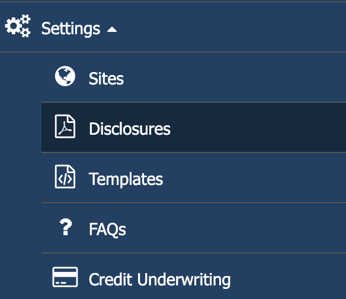
What is in Settings
| Area | What it controls |
|---|---|
| Sites | Each loan site's web address, branding, products, loan limits, renewal options and other site settings. |
| Disclosures | Your loan agreements, security agreement, e-sign disclosure and privacy policy. Upload a new version when your documents change. |
| Templates | The automated emails borrowers receive, from sign up to adverse action and loan completion. Your team edits the templates, and Autobooks can help if you run into problems. |
| FAQs | The questions and answers shown on your borrower loan sites. |
| Credit Underwriting | Your credit underwriting matrix: score tiers, limits, rates, grades and fees. |
You might use Settings after go live when:
- Your financial institution revises a loan agreement or disclosure
- Contact details, wording or branding in an email template change
- You update or change an FAQ
- You update your credit underwriting matrix
Warning: Many settings affect live applications and your compliance obligations. A change can apply to the very next application. Limit Settings access to one or two trained admins (usually your product owner).
Note: Email templates contain code and merge fields in double brackets. Editing the code can break the layout of the email.
Sites
Sites refers to your borrower facing loan sites. Business and consumer loans run on separate sites, each with its own products, documents and credit rules. Each site sits on your own web address, uses your branding and is reached from a link on your website or embedded inside online banking. Settings for each site include:
- Web address, and whether the site is live or private
- Logo, colors, banner images and About and Contact text
- Sender email address and phone number
- Products offered and maximum exposure
- Renewal options and cancel and decline reasons
- Sign up requirements and private invitation codes
Note: To limit where applications can come from by zip code, state or IP address, see Setting up restrictions: zip codes, states, and IP blocking.
Your institution can rename the product on its borrower sites, so borrowers may see your own product name rather than the one used in these articles.
Note: Most site settings are built with your Autobooks team during implementation. All site settings can be updated after go live if needed.
Credit Underwriting Matrix
Both consumer and business loan sites can offer a line of credit, a term loan or both. The products available are determined by your product owner during implementation with Autobooks.
Each product has its own section in the credit underwriting matrix:
| Site | Products |
|---|---|
| Business | Business line of credit, business term loan |
| Consumer | Consumer line of credit, consumer term loan |
The borrower is presented with loan terms for either a line of credit or a term loan, then chooses one of the products and may opt to lower the loan dollar amount before finalizing the application.